
Flagship Case Study / Applied Tooling
ProjectOS
Create a local-first environment where project state, human-readable artifacts, people, and agents share one coherent execution model.
A local-first operating system for project state, structured work, and agentic execution.
The project workspace should be the operational control plane for the work itself.
ProjectOS brings project state, reusable templates, documentation, automation, human operators, and specialized AI agents into one coherent execution model. The AI agent is not the architecture. The execution fabric is.
I — The core concept
ProjectOS begins with a local-first premise: project state should remain close to the operator, readable outside the application, and useful without making a remote service the center of the architecture. Desktop-first interaction gives the system a persistent operating presence rather than reducing it to another browser tab.
The project is modeled as a domain, not as a loose set of screens. Interfaces act through application contracts; contracts operate on structured project concepts; persistent artifacts retain the state in a human-readable form. This separation keeps the desktop experience, API surface, and future execution tools from becoming the domain model themselves.
- 01Human interfacesDesktop workspace · system tray
- 02Application contractsExplicit commands and queries
- 03Project domainStructured entities and relationships
- 04Local project statePersistent, human-readable artifacts
This arrangement also supports a low-friction Windows experience while allowing execution work to cross into a local Linux environment through an explicit boundary. The boundary is architectural: each interface receives a defined contract instead of direct authority over project state.
II — UI & interaction
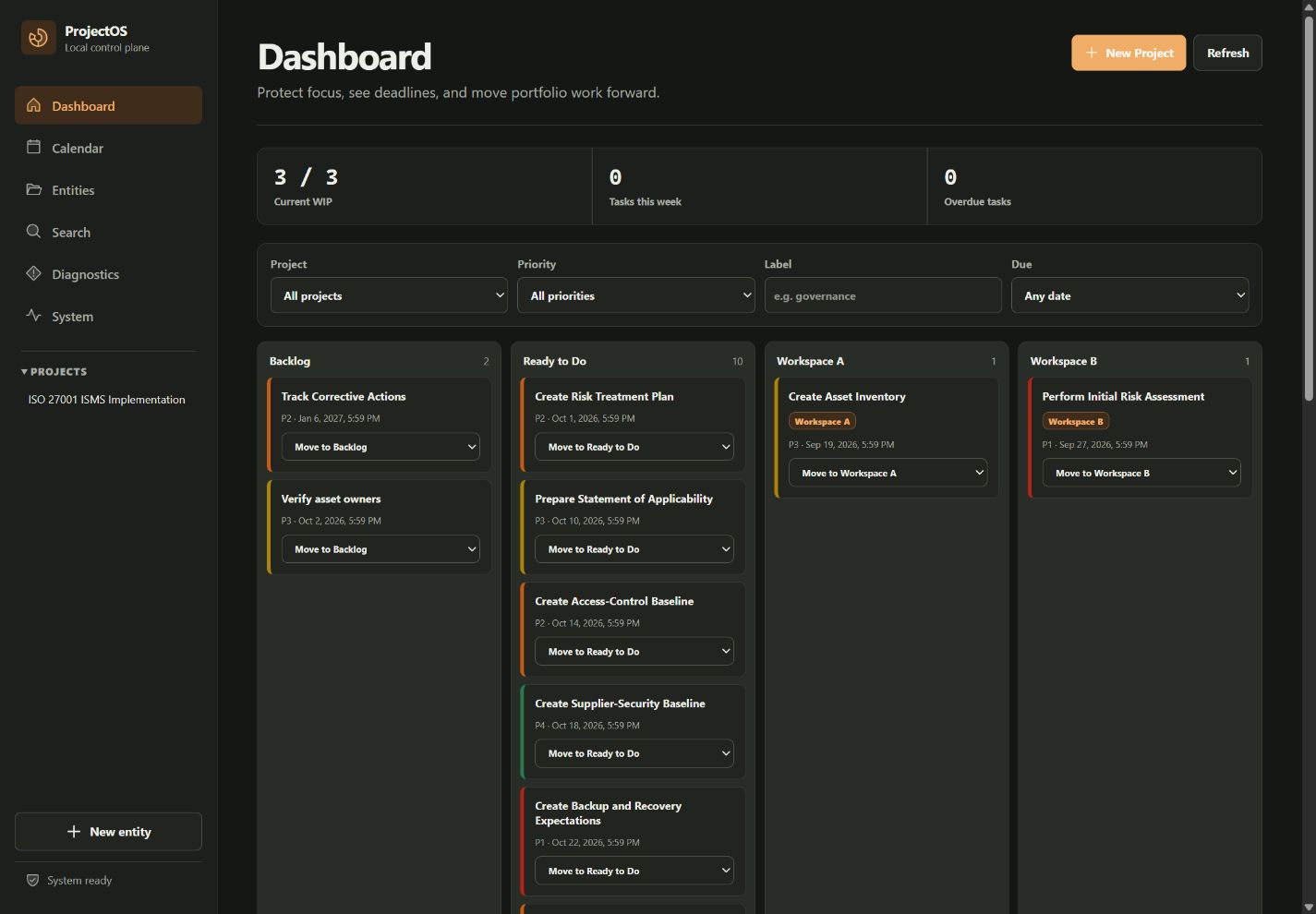
ProjectOS treats the desktop as an operating environment for the project. The primary workspace can occupy the full viewport, hold context across views, and remain reachable through the system tray. The goal is not to imitate a web dashboard; it is to reduce the distance between observing project state and acting on it.
The interaction model combines:
- dynamic Kanban swimlanes with visible work-in-progress measures;
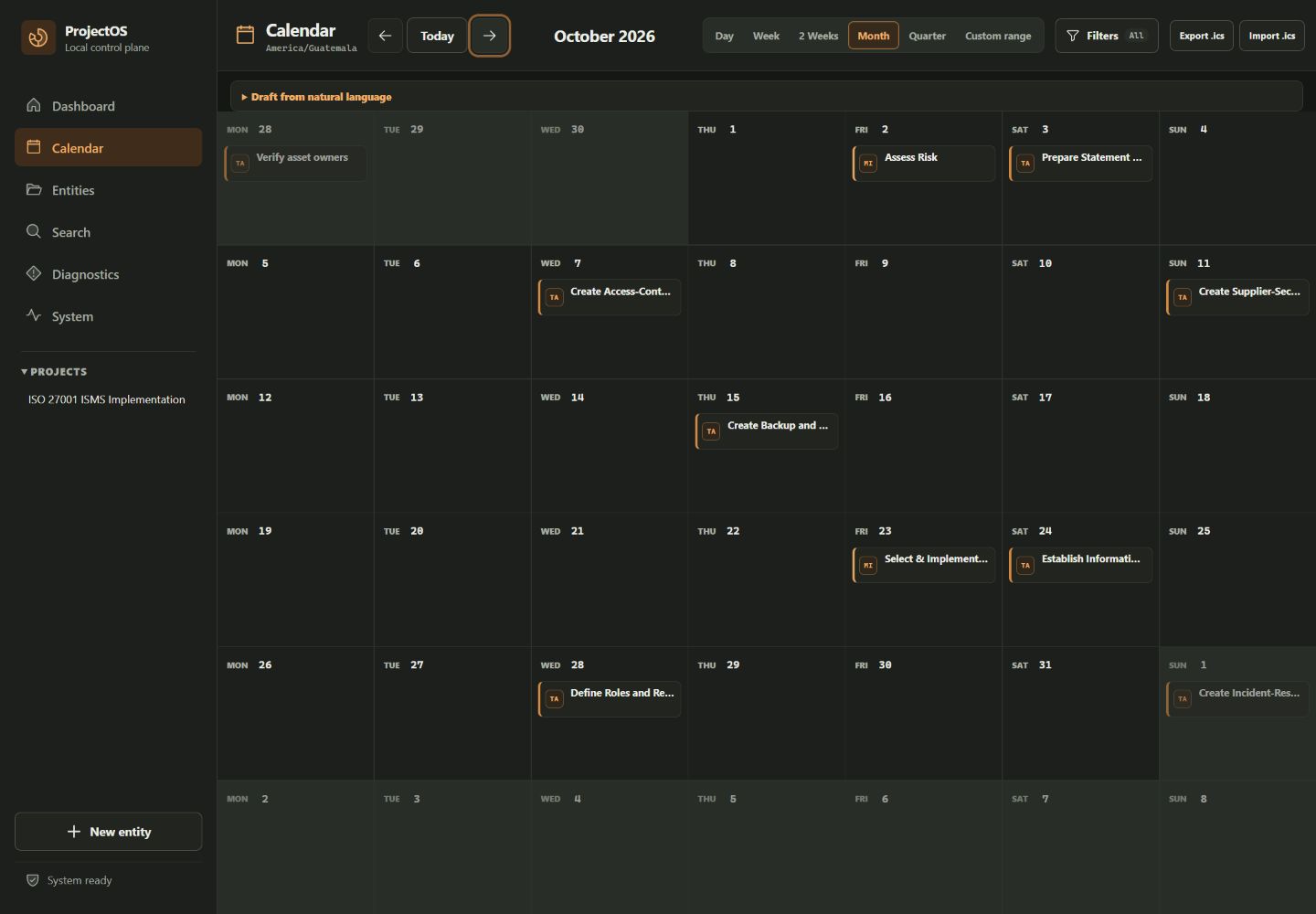
- an integrated calendar with Day, Week, Bi-week, Month, and Quarterly views;
- contextual panels that keep the selected entity and its relationships in view;
- drag-and-drop only for entities whose movement has a defined domain meaning;
- system-tray access for a persistent, low-friction desktop presence.
Kanban and Calendar are two projections of the same project model. A change in one view is not a decorative rearrangement; it is a project-state transition governed by the application layer. That distinction keeps interface convenience subordinate to the integrity of the work.
Current interface evidence
These direct captures show the present desktop GUI against ProjectOS’s synthetic demonstration workspace. They are product evidence, not conceptual mockups.
III — Project templates in practice
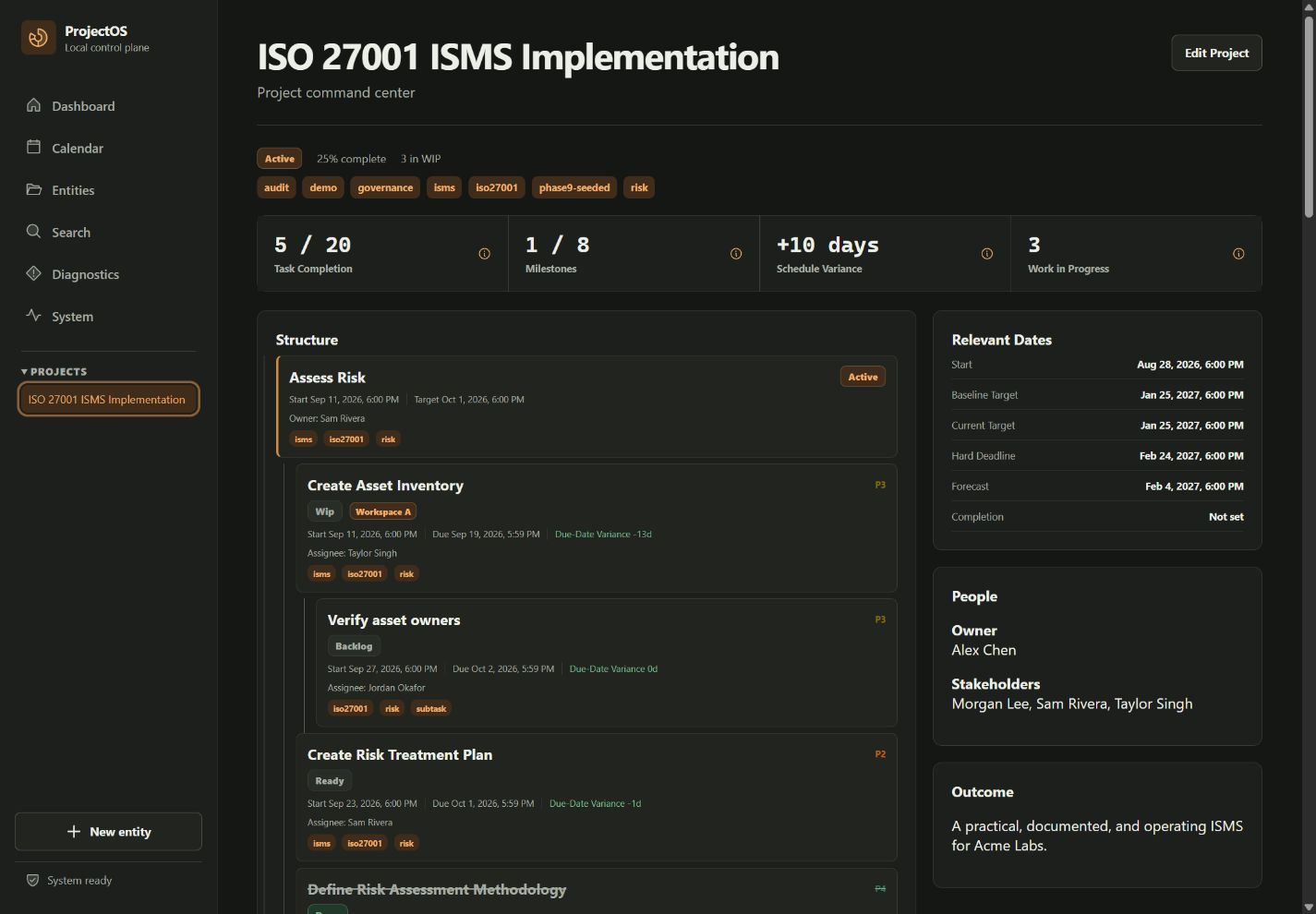
ProjectOS is not designed around ISO 27001. Its core model is general: projects contain structured entities, relationships, artifacts, responsibilities, views, and execution paths. Templates configure that model for a repeatable kind of work without redefining the platform beneath it.
An ISO 27001 / ISMS project template is used as a demanding example because it makes many ProjectOS capabilities visible at once. The template can express requirements, controls, implementation activities, responsible parties, evidence, reviews, and remediation as connected project records rather than isolated documents.
- 01Requirement
- 02Control
- 03Activity
- 04Owner
- 05Evidence
- 06Review
- 07Remediation
Within this template, controls can remain connected to implementation activities; evidence can remain connected to the decision it supports; remediation can return to the same project state instead of disappearing into a separate register. A different template could use the same ProjectOS primitives for a different domain and relationship model.
A template should configure the project model; it should not become the product architecture.
ISO 27001 is therefore evidence of template expressiveness, not part of ProjectOS’s design identity. The example also makes no certification claim for ProjectOS or for any organization using the template.
IV — The Agent Fabric
The Agent Fabric is the execution subsystem between authoritative project state and agent activity. It is not a single agent and it is not the project domain. It receives structured work from ProjectOS, establishes the human-authorized execution boundary, coordinates specialized agents and model routes, runs approved work through the local execution environment, observes what happens, and returns results with evidence.
- InterfaceProjectOS Desktop
- Project authorityApplication / API contracts
- Human-authorized fabric ingressStructured task + project context
- OrchestrationFirstmate · specialization + model routing
- Local runtimePi · Linux execution environment
- ExecutionTools + targets
The responsibilities inside the fabric
- 01Contract intake
- Receive a structured task and the relevant project context through the ProjectOS application boundary.
- 02Authorization
- Preserve the human-approved scope of the run, including which agent, tools, and execution targets are permitted.
- 03Specialization
- Assign work to an agent whose role and operating instructions match the requested task.
- 04Model routing
- Select the appropriate model route as an execution decision inside the fabric rather than embedding one model into the project architecture.
- 05Local execution
- Use Pi as the local Linux runtime through which the approved plan reaches tools and execution targets.
- 06Evidence return
- Return results, artifacts, and observable execution evidence to ProjectOS for human review and a deliberate project-state update.
Firstmate coordinates the run: it sits where structured work becomes agent assignment, model route, and execution plan. Pi supplies the local Linux runtime where that plan can call permitted tools. Herdr is orthogonal to the sequence; it observes the run across orchestration and execution rather than acting as another stage in the chain.
The boundary the fabric does not cross
The Agent Fabric does not own business intent, authoritative project state, or final approval. ProjectOS remains the system of record for the project; the human operator remains responsible for authorizing consequential work and accepting or rejecting the returned result. The fabric owns execution coordination and traceability between those two boundaries.
- 01Human intentDefine the desired project outcome.
- 02Structured taskExpress the work through the ProjectOS contract.
- 03Agent assignmentMatch the task to a specialized role.
- 04Model routeChoose the execution route inside the fabric.
- 05Execution planMake the intended steps inspectable.
- 06Tool callsRun only through the permitted targets.
- 07Result + evidenceReturn output with its execution record.
- 08Human reviewAccept, reject, or refine the returned work.
- 09Project state updateCommit the reviewed result to authoritative state.
Auditability is therefore a property of the fabric, not a report generated after the fact. Assignment, model route, plan, tool activity, result, and evidence remain distinguishable; human review is a named transition before agent output changes authoritative project state. This applies the same review boundary explored in Human judgment in AI-mediated operations and the bounded workflow method documented in AI-assisted technical operations.
V — Operating model
A project is not only a task list. It is a network of decisions and dependencies that accumulates organizational memory as work proceeds. ProjectOS keeps those relationships inside one graph so that documentation, project templates, execution, and review can refer to the same state.
Persistent centerProject graphOrganizational memory expressed as inspectable relationships.
- Decisions
- Responsibilities
- Tasks
- Meetings
- Documents
- Controls
- Evidence
- Risks
- Dependencies
- Actions
- Agents
That graph follows the Avantlord method at system scale: Observe → Decompose → Model → Build → Test → Refine. Observation creates records; decomposition names the parts; modeling preserves their relationships; building and testing generate evidence; refinement updates the state without erasing the reasoning that produced it.
VI — Closing thesis
Managing the project and operating the project increasingly become the same activity.
ProjectOS is a project operating system where people, project processes, and AI agents coordinate through one coherent execution model.
The aim is not autonomy as spectacle. It is a calmer operating environment in which project state is legible, templates make complex work reusable, automation is observable, and human authority remains explicit.